FluxClip
Screenshot utility for Windows.
Table of Contents
Motivation
Windows built-in methods for taking screenshots are fine, but I wanted a way to be able to have more control over making area selections because I take LOTS of screenshots and I like better precision and control.
Features
Like most sceenshot tools you have 3 methods of taking screenshots:
- Fullscreen (Desktop)
- Window (Client/Gui)
- Selection (Click and Drag)
My utility adds add a secondary Selection method:
- Selection (Select Points)
Sorry, no free-form… yet.
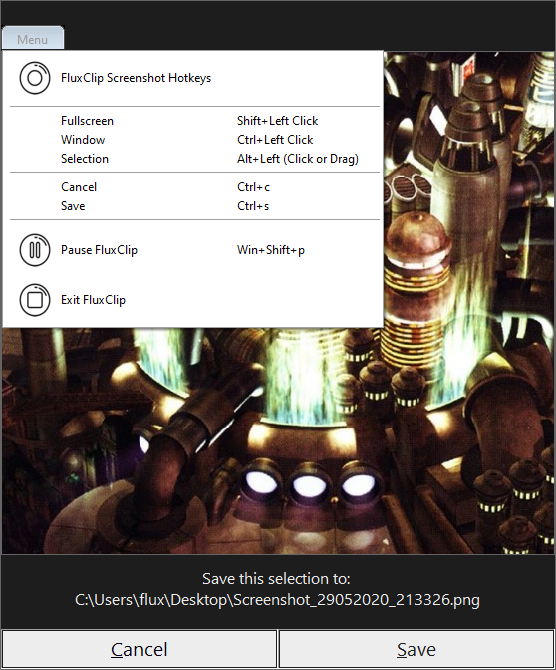
Only the selection methods show a preview.
Usage
FluxClip runs in the Windows System Tray and can be accessed with hotkeys. Hotkey Detection can be toggled by a hotkey or from the System Tray or gui (in selection preview) menu. All pitcures save as Screenshot_<timestamp>.png on the user’s Desktop.
This is an AutoHotkey program and can either be ran by my single file, compiled executables or from the multiple source script files.
Hotkeys
Hotkeys - Anywhere
| Action | Hotkey |
|---|---|
| Pause detection | [Win]+[Shift]+p |
| Fullscreen Clip | [Shift]+Left Click |
| Window Clip | [Control]+Left Click |
| Selection Clip - Drag | [Alt]+Left Click - Drag |
| Selection Clip - Click | [Alt]+Left Click - Point A; then Point B |
Notes:
- Point B can be changed at any time and as many times as you want as long as the [Alt] key is still held down.
- When using the Drag method; if the selection looks strange and overlays your area make sure you let go of the mouse button befor letting go of [Alt].
Hotkeys - In Selection preview
All the normal hotkeys plus:
| Action | hotkeys |
|---|---|
| Cancel | [Control]+c |
| Cancel | [Esc] |
| Save | [Control]+s |
Downloads/files
Compiled Executables
Source Files
Media
Preview of selection
Video
Plans
Future plans to add free-form selection and a Python version.
License
This program is free software: you can redistribute it and/or modify it under the terms of the GNU General Public License as published by the Free Software Foundation, either version 3 of the License, or (at your option) any later version.
This program is distributed in the hope that it will be useful, but WITHOUT ANY WARRANTY; without even the implied warranty of MERCHANTABILITY or FITNESS FOR A PARTICULAR PURPOSE. See the GNU General Public License for more details.